
How To Remove A Shared User From Your Zencam Account.
When you remove the shared user from your Zencam account, they will no longer have access to this device in their account. To proceed with the removal process, please follow the step by step guide provided below.
Step 1: Please log into your camera via the Zencam Security app.
Step 2: Once you are logged into your camera, please select the settings (gear wheel) icon in the upper right hand corner.
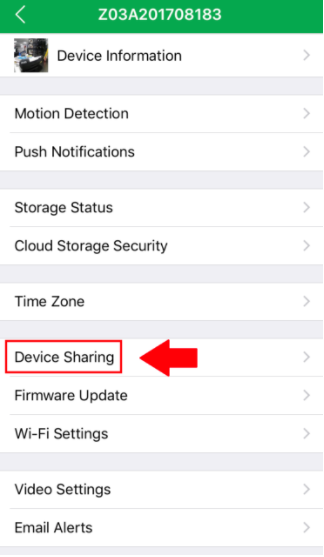
Step 3: In the settings menu, please tap on the "Device Sharing" tab.
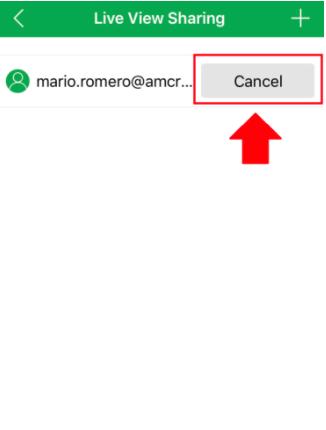
Step 4: In the "Live View Sharing" menu, select the shared user you would like to remove and press "Cancel".
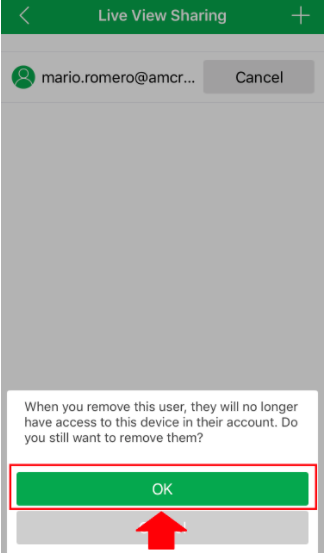
Step 5: Once you have selected cancel, you will be prompted as to whether or not you would like to proceed with the process. If you wish to proceed, please press "OK" to continue.
Congratulations! You have now successfully removed a shared user from your Zencam security camera.
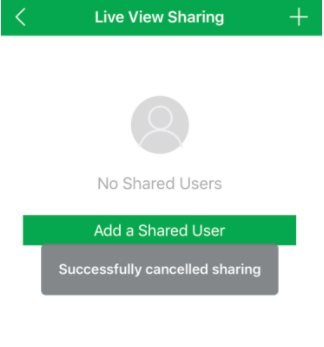
The shared user you have selected has now been removed from your account and will no longer have access to your camera's live viewing, recordings, playbacks, or two-way audio features.
Comments
Please sign in to leave a comment.